
Component Scanner
The plugin triggers an on-demand scan of your components the moment you click 'Generate Design System Page' — no manual step required.
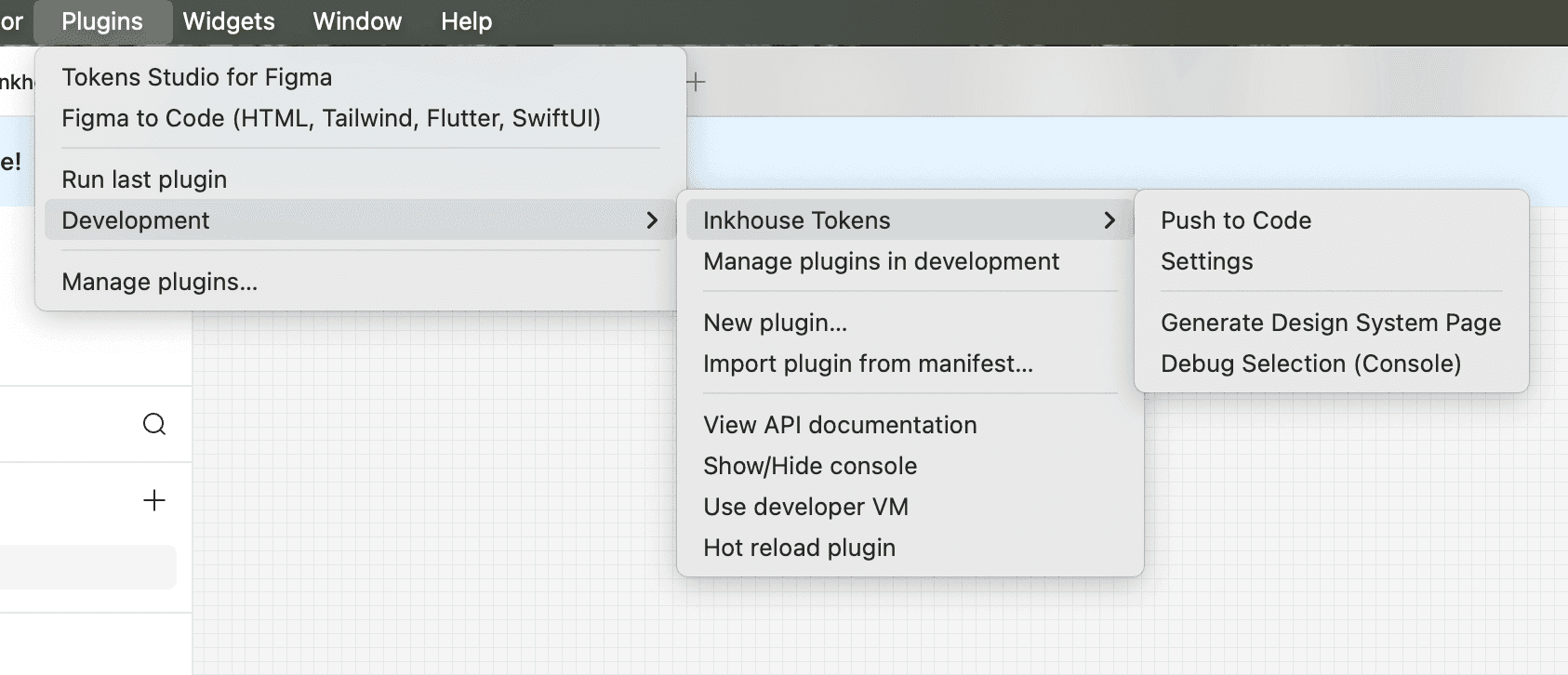
How it works
When you click 'Generate Design System Page' the plugin calls your running dev server at `GET /api/inkbridge/scan-components`. This route (created by `inkbridge setup`) runs `node_modules/inkbridge/scanner/cli.ts` via tsx, which reads your `inkbridge.config.json` to find component paths, scans all `.stories.tsx` files, extracts base classes, variant maps, icon usage, and design tokens, then writes `.inkbridge/component-definitions.json` and returns it directly to the plugin. Component data is always live — no stale cache.
Usage
- 1
Ensure your dev server is running (`pnpm dev`).
- 2
Open the plugin in Figma and click 'Generate Design System Page'.
- 3
The plugin calls `GET /api/inkbridge/scan-components` on your dev server.
- 4
The scanner reads `inkbridge.config.json` to find your component paths (auto-detected from Storybook on first setup).
- 5
Results are returned directly to the plugin — component data is always scanned live, never stale.
- 6
Manual scans are not part of the normal workflow — the API route handles every Generate click automatically. (If you need to run the scanner standalone for debugging, invoke `pnpm tsx node_modules/inkbridge/scanner/cli.ts` directly.)