
Compile your code into a design system every tool can read.
Inkbridge compiles your React and Storybook components into one design-system model — rendered as native Figma frames and read by any AI agent over MCP. You write the components experts already write; we make them a system every tool can read.
One model, every consumer
Your components compile to one design-system model. Figma renders it, AI agents read it over MCP, and conformant edits flow back to your code — the same components stay canonical end to end.
Generate the Figma design system from your stories
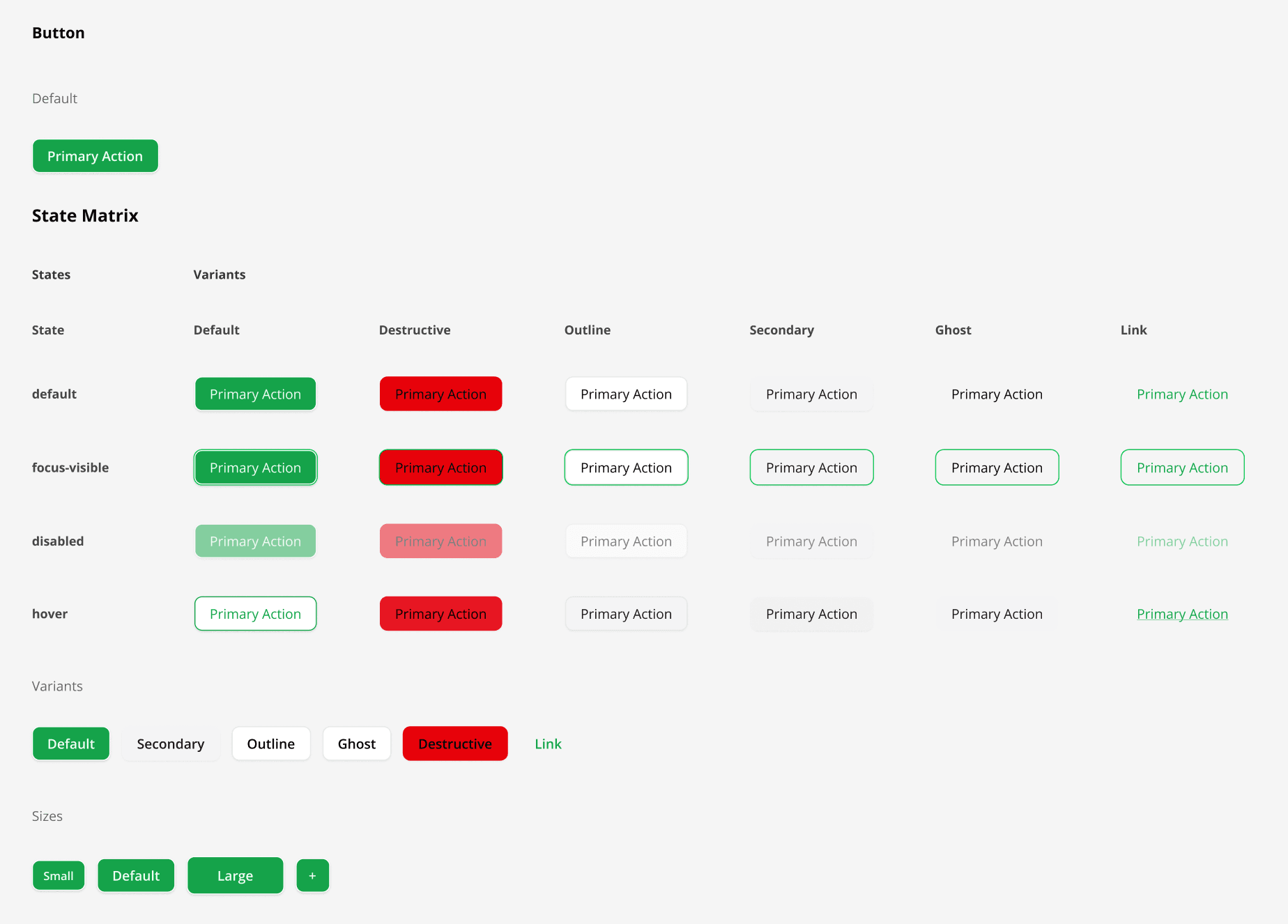
Inkbridge scans your Storybook stories and renders each one as a native Figma frame. What designers see in Figma is built from the same code that ships.
- 1
Install the npm package
Run pnpm add -D inkbridge in your Next.js project — Tailwind or MUI — then pnpm exec inkbridge setup to wire up the scanner routes.
- 2
Load the plugin in Figma Desktop
Plugins → Development → Import plugin from manifest, point at node_modules/inkbridge/manifest.json. One-time setup.
- 3
Generate the design system page
Run pnpm dev, then click Generate in the plugin. Every story becomes a Figma frame with your exact styles.
AI agents read the model and write conformant code
Point any MCP-speaking agent at the same model. It reads your components, variants, and tokens, generates code that conforms, and writes it back — no Figma in the loop. Designers can still push token edits from Figma as a pull request.
- 1
Connect the MCP server
Run inkbridge mcp (or let inkbridge setup wire it into .mcp.json). Your agent can now read the design system — components, variants, and tokens.
- 2
Ask for UI in plain language
“Add a destructive variant to the alert.” The agent reads the real components and tokens first, then drafts code that reuses them.
- 3
Write it back, conformance-gated
write_component checks every file against the model and lands the component + story in your working tree — you review the diff and commit.
Stories are the source. Figma is generated. Edits round-trip back.
Two flows — both start and end in your stories. The story file stays canonical.
Generate Figma from your stories
Plugins → Inkbridge → Generate Design System Page
Push edits back as a pull request
Edit colours or spacing in Figma Variables — open a GitHub PR in one click
Edit in Figma Variables
Change a token value directly in Figma — no JSON editing required.
Preview the diff
Inkbridge shows exactly which lines will change before anything is committed — CSS custom properties for Tailwind projects, theme.ts literals for MUI.
Open a pull request
One click creates a branch, commits the updated tokens, and opens a PR ready for review.
Push to Code
Commit Message
PR Description (optional)
Figma was the first consumer. Now AI is too.
Your stories are the source of truth. Figma renders them — and now any AI agent can read the same design-system model over MCP, no Figma in the loop. Point an agent at your project and it generates new components that conform to your tokens and variants.
$ npx inkbridge setuplist_componentsEvery component with its kind, variant axes, and stories.
get_componentThe full resolved definition — classes, variants, states.
get_tokensYour design tokens — consumer-authored or the full merged map.
Starter templates
Pre-configured with Storybook, the Inkbridge routes, and a committed .mcp.json. Clone and run pnpm dev.
Tailwind + shadcn/ui starter
Next.js 16 · Tailwind v4 · shadcn/ui · Storybook
Material UI starter
Next.js 16 · Material UI v9 · Emotion · Storybook
Built to keep the story canonical
Every piece does one thing — make sure the Storybook story stays the source of truth between design and code.
Story-driven scanning
Inkbridge reads your Storybook stories — JSX, variants, decorators — and renders each one as a Figma frame with the exact styles, Tailwind or MUI.
One model, every consumer
Your stories compile to one design-system model — rendered as a Figma page and read by AI agents over MCP. Tokens, components, themes, states; generated every run, always in sync.
Token round-trip
Edit colours, spacing, or radius in Figma; Inkbridge captures the diff and opens a PR against your stories — reviewable like any code change.
GitHub PRs from Figma
Push token edits straight to your repo as a pull request — no copy-paste, no manual sync step, no out-of-band edits.
Themes built in
Light, dark, and any custom themes you define in your tokens are rendered together — and bound to Figma Variables where Figma allows it.
Reads your existing stack
Tailwind v4 + shadcn/ui or Material UI v9, Storybook, Next.js — Inkbridge reads what’s already in your repo. No bespoke config, no parallel design source.
Frequently asked questions
The methodology, the setup, and the common questions.
One source of truth, every consumer in sync
Your stories are the source of truth, and every consumer stays in sync with them. Figma renders them as frames; AI agents read the same model over MCP — one canonical artifact, never diverging.