
Figma Layer Naming
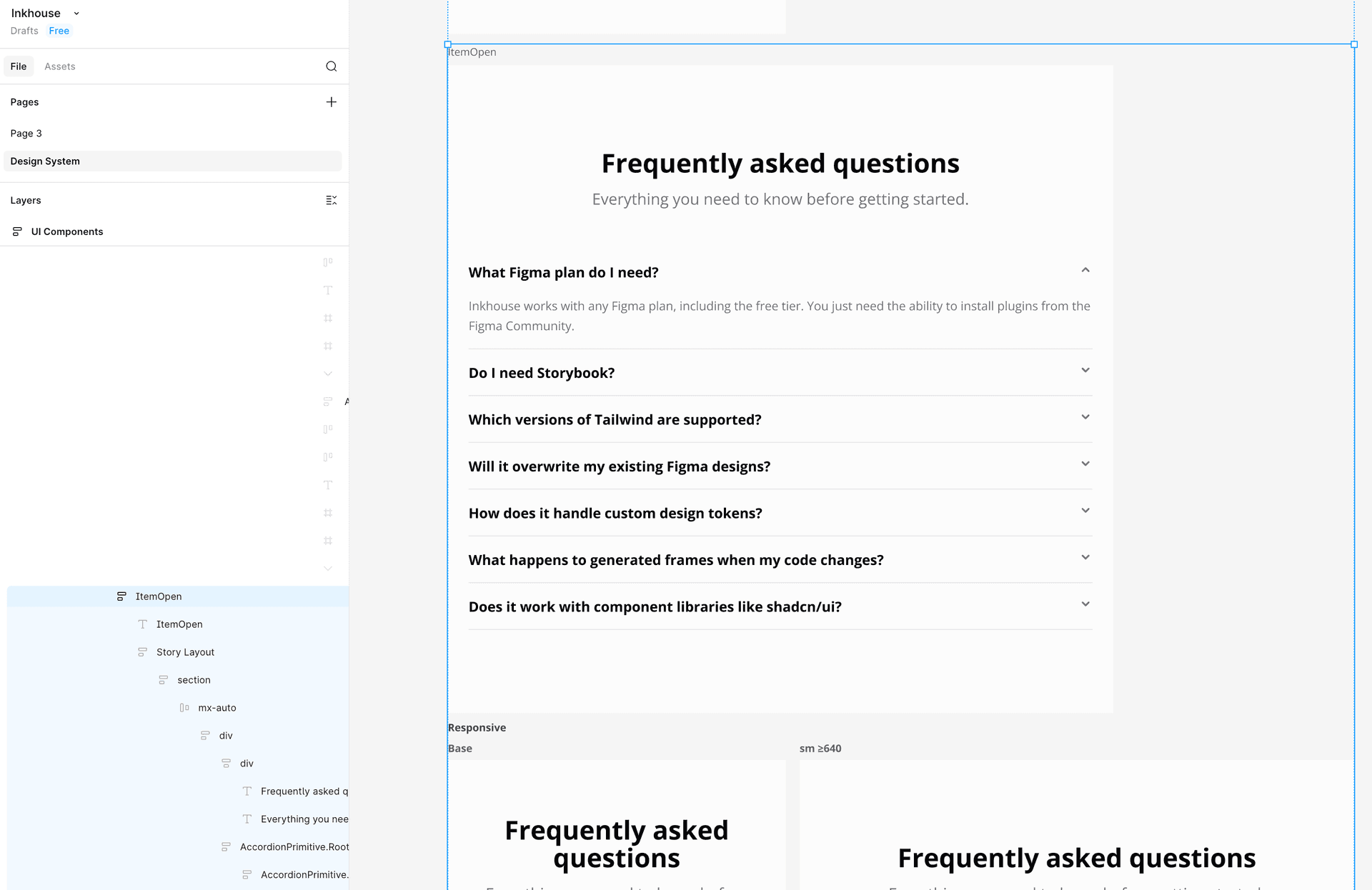
Every Figma frame and layer is named after its story — so designers can navigate the layer panel without guessing what anything is.
How it works
When the plugin creates frames in Figma, it names each top-level frame after the Storybook story that produced it — 'Default', 'Item Open', 'Disabled', etc. Nested layers follow the component and element structure, so a frame called 'FaqSection / Item Open' contains child layers that reflect the actual JSX hierarchy. Designers can jump straight to the right frame from the layers panel, and developers can see exactly which story maps to which frame.
Usage
- 1
Name your Storybook story exports clearly — 'Default', 'WithIcon', 'ItemOpen', etc.
- 2
Run 'Generate Design System Page' — each story becomes a Figma frame with that exact name.
- 3
Open the Figma layers panel to see frames named after your stories.
- 4
Nested layers reflect the JSX tree of the component — no anonymous frames.