
State Previews
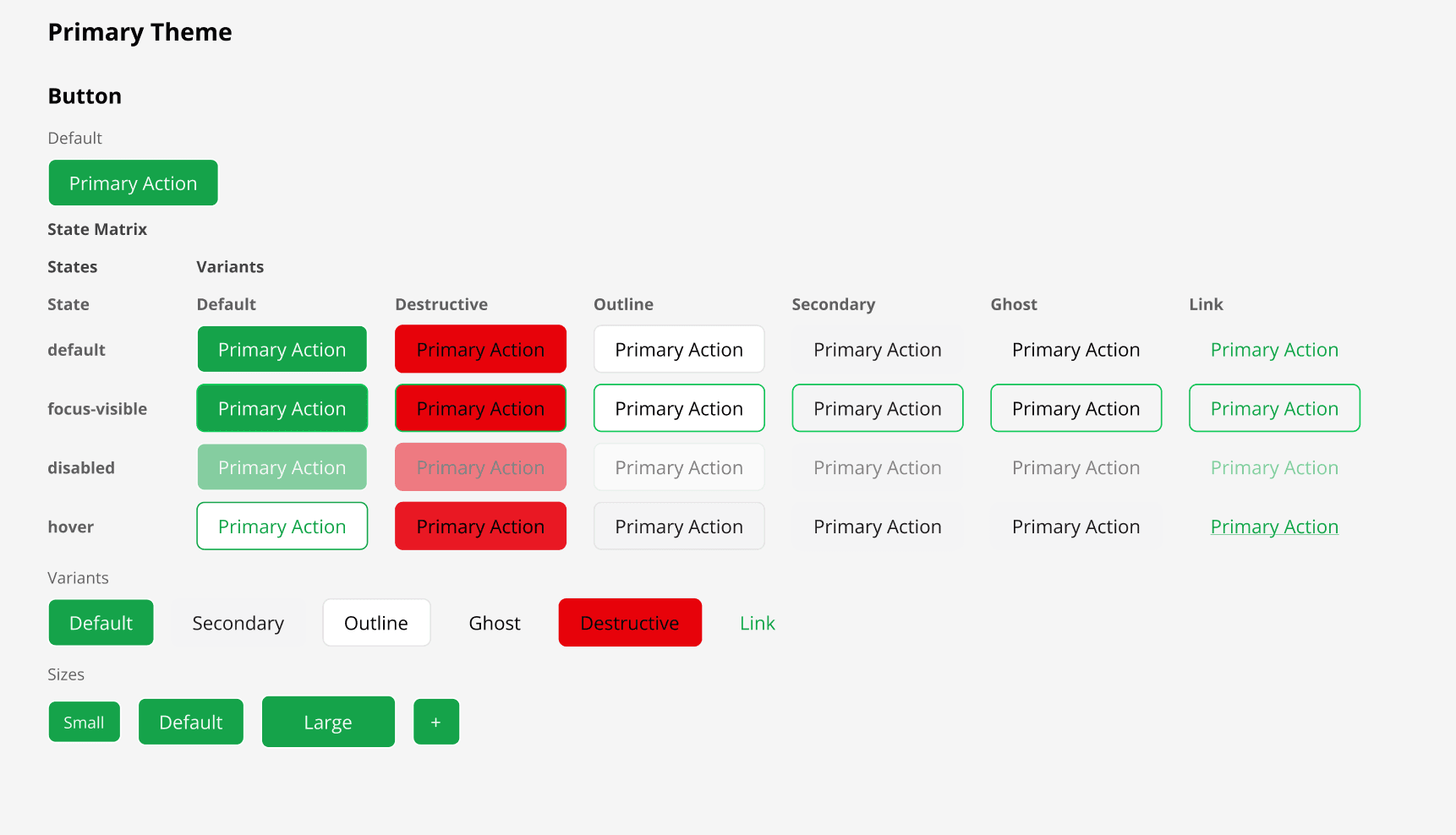
Hover, focus, disabled, and custom states are rendered as a matrix alongside the default — pinned to your bare-primitive Default story.
How it works
For components with interactive states (defined via CVA or manual state classes), the plugin generates a state matrix: a grid of frames with each state applied. Designers can see default, hover, focus, disabled, and error states at a glance without needing to manually override fills in Figma. The matrix is attached to one specific story per component — a story named `Default`, or the first story if no `Default` exists. When the chosen story wraps the primitive in another slotted component (e.g. `<Label htmlFor="x"><Input id="x" />`), the matrix is suppressed because the same shape can indicate a structurally-compound primitive (Slider's Track + Range + Thumb) where the matrix can't reconstruct the geometry. The convention: keep a bare-primitive `Default` story (`<Input placeholder="…" />`) as your first export — that gives the matrix something to render against. Your richer compositional stories (`FormField`, `States`, …) keep rendering their tree exactly as written.
Usage
- 1
Define interactive states using CVA variants or by writing state-specific Tailwind classes (e.g. `disabled:opacity-50`, `focus-visible:ring-2`, `aria-invalid:border-destructive`).
- 2
Export a story named `Default` that renders just the bare primitive (no wrapping `<Label>`, no parent grid). This is the story the State Matrix attaches to.
- 3
Optionally keep richer compositional stories (`FormField`, `States`, …) — they render as you wrote them; only the matrix is gated by the Default rule.
- 4
Run 'Generate Design System Page' — each detected state (default, hover, focus, disabled, error, …) becomes its own Figma frame above the Default story.
- 5
State frames are arranged in a row and labelled so designers can compare side by side.